
Understand what the native integration can and cannot do
HubSpot's native Meta ad conversion events can synchronise eligible form submissions and CRM lifecycle-stage changes through Meta's Conversions API. The purpose is to give Meta a stronger signal than the initial lead alone.
However, this is not permission to assume every HubSpot contact or website event can optimise every Meta campaign. HubSpot documents restrictions around eligible lead-generation campaign interactions, HubSpot forms and Meta's Conversion Leads optimisation. Check the current product requirements before choosing the architecture. HubSpot's current Meta Conversions API documentation.
If the native integration does not cover the campaign, form or CRM logic, design a separate server-side implementation with explicit consent, stable event identifiers, matching data and monitoring. Do not combine two implementations without a deduplication plan.
Choose one implementation route
| Route | Use it when | Evidence required | Main risk |
|---|---|---|---|
| Native HubSpot integration | The campaign, form, account and lifecycle requirements are supported | Connected account, eligible pixel, clean lifecycle rules and test contact | Assuming unsupported campaigns or historic stage changes will sync |
| Custom server-side route | The business needs website, product or CRM logic the native integration cannot represent | Consent basis, event contract, matching fields, stable ID, retries and monitoring | Weak engineering ownership, duplicate events or stale payloads |
| Do not connect yet | Sales stages are inconsistent or the account cannot reconcile leads to CRM records | Stage definition, source capture and contact-level reconciliation | Automating a signal the business does not trust |
The architecture decision should be written before implementation. Name the system that owns the stage, event timestamp, deduplication key, match fields, campaign objective using the event and the person responsible when volume stops.
Set up the connection in the right order
- Clean the CRM stages. Define Lead, qualified lead or SQL, opportunity and customer using rules sales actually follows.
- Connect the active Meta ad account. Confirm ownership, permissions, campaign eligibility and the appropriate Meta business setup.
- Audit the pixel installation. Identify whether the pixel comes from HubSpot, GTM, theme code, a plugin or another partner integration.
- Choose one installation owner. A manual pixel alongside another installation can create duplicate browser events and inconsistent reports.
- Create conversion events after the mapping is final. HubSpot states that only eligible changes or submissions occurring after creation are counted.
Do not change CRM history solely to manufacture conversion volume. The event should represent a real commercial progression with a timestamp, definition and accountable owner.
Map commercial stages, not internal administration
| CRM stage | Send when | Optimisation value | Common mistake |
|---|---|---|---|
| Lead | Contact submits an eligible form | Volume baseline | Treating every form fill as quality |
| Qualified lead / SQL | Fit and need meet documented rules | Better lead-quality signal | Stage changed automatically with no review |
| Opportunity | Sales accepts a real commercial process | High-value but lower-frequency signal | Sending open deals with no consistent definition |
| Customer | Revenue or enrolment is confirmed | Outcome validation | Too sparse to be the only optimisation event |
Choose the deepest event with enough recent volume to remain useful. If opportunities are rare, optimise toward a consistently defined qualified-lead event while using opportunity and customer data to evaluate campaign quality.
What an implementation audit should produce
Stage owner, entry condition, timestamp, reversals and expected delay.
Source, destination, primary use, identifiers and deduplication.
Account requirements, unsupported cases and implementation owner.
Expected records, diagnostics, reconciliation window and failure alert.
Stable event delivery, trusted definition and a complete test window.
Zero-event alert, stage changes, data-quality review and recovery owner.
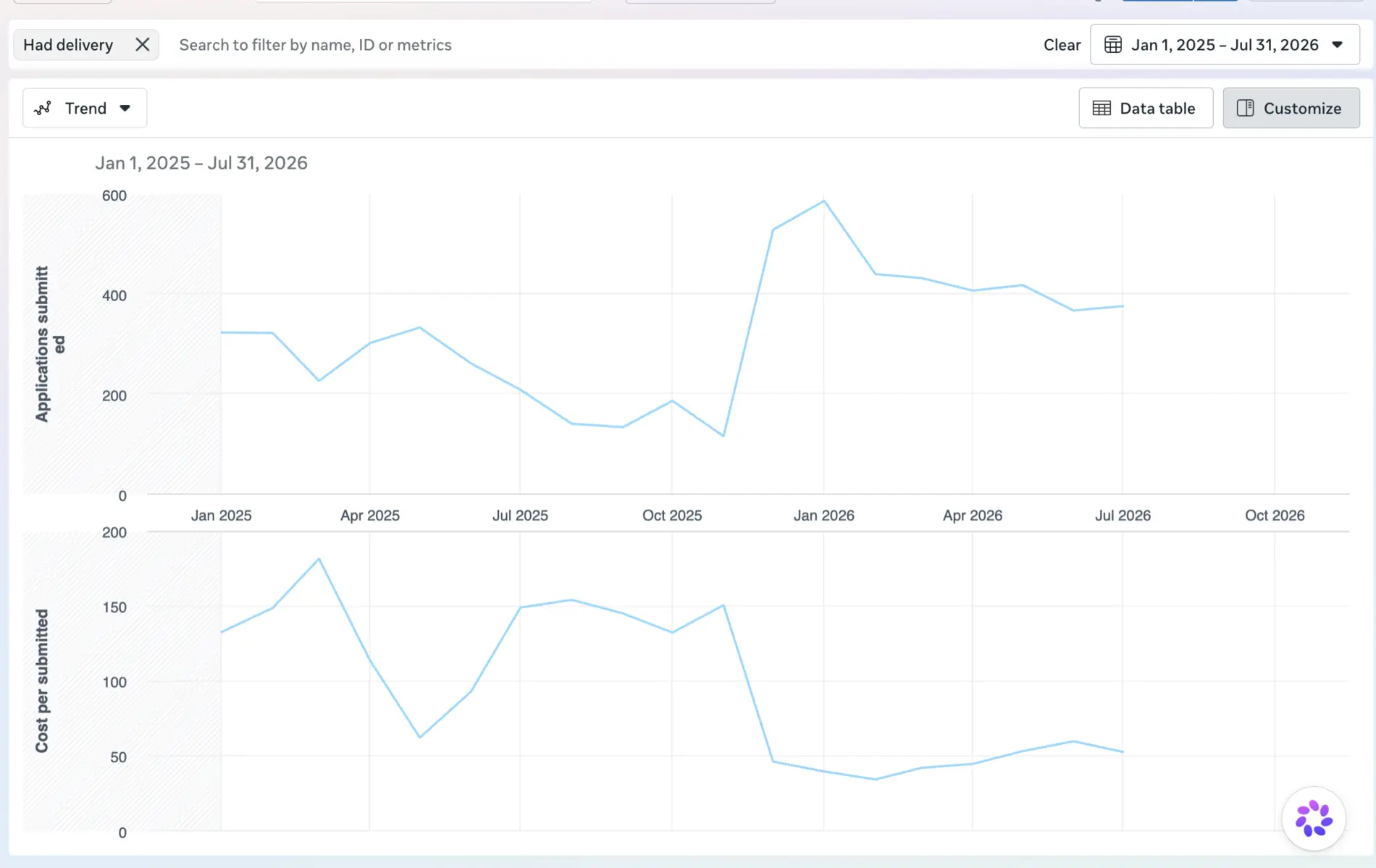
This dashboard can show application volume and unit cost, but it cannot prove qualification or pipeline by itself. HubSpot lifecycle outcomes are the missing evidence layer. Results are account-specific.
For a wider account-level diagnosis, use the B2B paid media audit service. If the core problem is sales rejecting cheap leads, start with the poor B2B lead quality solution.
Validate the signal before changing campaign optimisation
- Trigger a controlled eligible lead and record its HubSpot contact, source and timestamp.
- Move the contact through the intended stage using the real qualification rule.
- Confirm the event appears in HubSpot's Ads events view and Meta Events Manager.
- Review event diagnostics and customer-data recommendations rather than checking only whether one event arrived.
- Compare a contact cohort from lead to SQL and opportunity; document why platform totals differ.
- Run the new optimisation event through a stable test window without simultaneously changing offer, creative, audience and form.
Monitor match quality, event volume, stage lag, duplicate indicators and the share of events tied to the intended campaign type. Judge the system using cost per qualified lead, opportunity rate and pipeline—not the reported uplift in raw conversions alone.
For the wider cross-platform process, use the Offline Conversion Tracking Playbook. For campaign structure and creative decisions, review Meta Ads management.
Frequently asked questions
Can HubSpot send lifecycle-stage changes to Meta?
Yes. After the eligible Meta Ads account and pixel are connected, HubSpot can create Meta Conversions API events for selected CRM lifecycle-stage changes. Only eligible changes that occur after the conversion event is created are counted.
Does the HubSpot Meta integration work for website campaigns?
HubSpot's documented lifecycle-data optimisation has important campaign, form and product requirements. Confirm the exact campaign type, source and account capability before treating the native route as a universal website-event pipeline.
Should the Meta Pixel also be installed manually?
Not without an explicit ownership and deduplication plan. A second installation can create duplicate browser events and inconsistent reporting. Audit every pixel source before changing production tracking.
Why do HubSpot and Meta event counts differ?
The totals are not expected to match exactly because each platform applies its own eligibility, timing and attribution rules. Reconcile contact-level stage movement, timestamps, ad-interaction criteria and event diagnostics instead of forcing identical totals.
Which HubSpot stage should Meta optimise toward?
Use the deepest stage that has a stable definition, reliable delivery and enough recurring volume to guide the campaign. For many B2B accounts that is a consistently reviewed qualified-lead stage rather than a sparse customer event or every raw form fill.
Primary sources and limitations
Product requirements and links were checked on 29 August 2026. HubSpot and Meta can change packaging, interface options and eligibility. Verify the live account before implementation.